AURUM Neyro Quantum Alpha: The Complete 11-Step Setup Guide for Self-Custody AI Trading

By Danny Allan
Founder & lead analyst, CryptoWatchdog · former Complaints Manager at Crypto.com
27 April 2026· Updated 18 June 2026

Self-custody AI crypto trading is a real category now, not just a pitch deck. The idea is simple enough: a trading bot gets permission to act through a smart contract while your money stays in a wallet only you can sign from. AURUM's Neyro platform is one of the products built around that model, and its first live agent — Quantum Alpha — is what most people will run into first.
We'll be upfront about something before you read on. AURUM is one of our affiliate partners, so we earn a commission if you sign up through the link in this article. That's exactly why the rest of this guide stays close to what you can check yourself: what Neyro is, how the non-custodial setup is supposed to work, the eleven screens you'll see when you connect a wallet, and which of AURUM's numbers we could verify versus which are still just the company's own claims. Where a figure isn't independently confirmed, we say so rather than repeat it like a fact.
First steps, in order: 1) Sign up for Aurum here → 2) Fund the $19.99 annual licence → 3) Open Financial Proposals → Neyro → 4) Connect your Polygon wallet → 5) Allocate USDT to Quantum Alpha. The full walkthrough, with the catches, is below.
What is AURUM Neyro?
Neyro is AURUM's AI-powered trading product: a set of trading agents that execute through smart contracts while, on paper, leaving your funds in your own wallet. You don't deposit capital with AURUM, and you don't hand over a private key. The AI produces signals, those signals route through contracts on Polygon, and your USDT is meant to stay somewhere only you can sign from.
That's the headline difference between two models people often lump together. Custodial copy-trading means the platform holds your money — and if it disappears, so does your balance. Non-custodial AI trading means the bot holds a scoped permission to perform specific contract actions, and nothing more. The distinction is the whole reason self-custody matters: not your keys, not your coins is a hard-won lesson from a decade of exchange collapses, and the principle is worth understanding from a neutral source before you trust any platform's version of it.
One thing to keep in mind: "non-custodial" is a design claim, and the strength of it depends entirely on what the smart contract you sign is actually allowed to do. We cover that in the risk section. For a deeper primer on the model itself, read our companion article: Self-Custody AI Crypto Trading Explained.
How does Neyro actually work?
Neyro is built in three layers that are meant to stay separated:
- The AI layer. Trading agents read market data, apply strategy settings, and produce trade signals.
- The smart-contract layer. Those signals get executed on-chain through a Polygon contract you've explicitly approved.
- Your wallet. Funds stay in your custody. The contract is supposed to have permission only to open and close positions on a decentralised exchange — nothing else.
The selling point is straightforward: if AURUM's servers went dark tomorrow, your funds would still be in your wallet. Whether that holds in practice comes down to the contract's permissions, which is something you can and should inspect when you sign. Polygon is a public chain, so the contract and its activity are visible on a block explorer — Polygon's own developer documentation explains how that works if you want to verify the chain side yourself.
For a side-by-side comparison with custodial copy-trading bots, see our Copy AI Trading guide.
Phase 1 vs Phase 2 — what's live right now
Phase 1 (closed beta, limited to early founder wallets): the first live Neyro agent, Quantum Alpha, is available. You connect a wallet, fund a balance, and copy Quantum Alpha's trades through the non-custodial contract setup.
Phase 2 (described as rolling out next): the broader agent platform. AURUM says you'll be able to create your own agents, tune them to your strategy and risk profile, find other agents through public leaderboards, and run public or private agents with more configuration and analytics. Phase 2 isn't live as we write this, so treat that feature list as a roadmap, not a promise.
Phase 1 is where the early-access pricing sits. AURUM says each beta slot is capped, and that the first 100 annual sign-ups get their $19.99 licence credited back to their Aurum wallet within five business days. We haven't independently confirmed the cap or the rebate timing — they're the company's stated terms, so check them against your account before assuming. Sign up here.
Meet Quantum Alpha — the first live agent
Quantum Alpha is the first trading agent inside Neyro. AURUM describes it as specialising in automated futures trading on highly liquid tokens — the top-cap pairs where liquidity is deep and slippage is more predictable. Trades are said to execute exclusively on decentralised exchanges via smart contracts, which, if accurate, means every fill should be verifiable on-chain.
Here's where we slow down. AURUM reports closed-beta performance of +31.20% on its top-performing tracked window, alongside a published slot counter (7 of 15 connected when this was written, with 8 left in that cohort). Both numbers come from AURUM's own dashboard. We have not independently audited the trade history behind the +31.20% figure, and a single best window is not the same as the agent's overall return. Treat it as a marketing figure until you can pull the on-chain trade record yourself and check it. Cherry-picked performance windows are one of the oldest tricks in trading promotion, and regulators warn about exactly this kind of claim — the U.S. CFTC's guidance on automated and "AI" trading systems is worth a read before you weigh any bot's headline number.
How to connect Quantum Alpha — the full 11-step walkthrough
This is the exact flow you'll see on screen. Have MetaMask, Trust Wallet, or another Polygon-compatible wallet ready before you start.
Step 1 — Log in to your AURUM backoffice
Open your AURUM account and go to the main Dashboard. If you don't have an account yet, create one here. The licence is $19.99/year, and AURUM says the first 100 sign-ups get it credited back.
Step 2 — Open "Financial Proposals"
In the left-hand menu, find the section Financial Proposals and click to expand it.
Step 3 — Select "Neyro"
Under Financial Proposals, click Neyro to open the Neyro trading agents page. You should land on a screen that looks like the one in Step 4 below.
Step 4 — Click "Connect Wallet & Get Access"
At the top of the Neyro page, press Connect Wallet & Get Access. This starts the connection of your Web3 wallet to Neyro.
Step 5 — Connect your wallet
In the pop-up window, choose the wallet you want to link and click Connect to WalletConnect. Set your wallet to the Polygon network so Neyro can access all features.
Step 6 — Select your wallet
In the "Connect Wallet" window, choose the wallet you want to use with Neyro — for example MetaMask, Trust Wallet, OKX Wallet, or SafePal. Make sure it's already installed and configured on the Polygon network before you proceed.
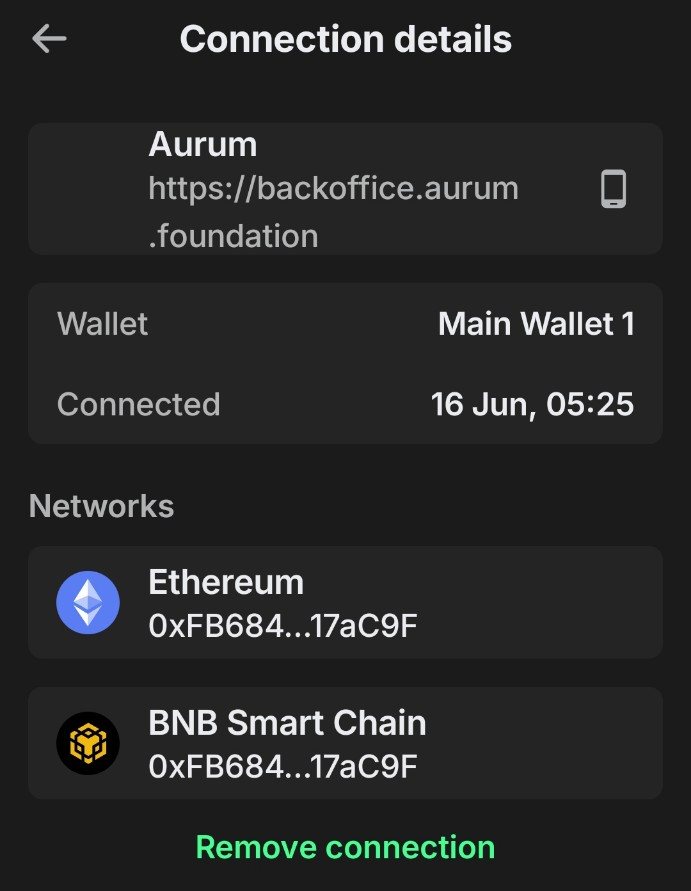
Step 7 — Check your connected wallet
After approving the request, you'll see your wallet listed as Connected Wallet in the Aurum backoffice. Verify the address shown is the right one. You can disconnect at any time with Disconnect; otherwise press Close and carry on.
Step 8 — Return to Neyro in the backoffice
Go back to the AURUM backoffice and open Financial Proposals → Neyro again.
Step 9 — Click "Get Access"
On the Neyro page, press Get Access to activate your early-access slot and link the subscribed funds to Neyro.
Step 10 — Select Quantum Alpha as your agent
In the Top Performing Agent block, choose Quantum Alpha, enter the amount you want to allocate (within your funded balance), and confirm to start copying the agent's trades.
Step 11 — Confirm the transaction in your wallet
Your wallet opens a contract confirmation window. This is the moment that matters most for a self-custody setup: read what you're signing. Check the network, the destination contract address, the fees, and — if your wallet shows it — the spending permission you're granting. A blind approval is how non-custodial setups stop being safe. When it all checks out, click Confirm. After that, your funds are subscribed and the agent setup is complete.
Ready to run the steps above?
Open your AURUM account and connect Quantum Alpha
$19.99 annual licence · AURUM says it's credited back to the first 100 founders within 5 business days.
Activate my account →Where can I track trading results?
Once funds reach the smart contract, AURUM gives you a personal stats page where you can watch trade execution, current metrics, and the agent's performance. Because the trades are on Polygon, you don't have to take that page at its word — you can pull the same transactions from a Polygon block explorer and check them independently. We'd treat that on-chain record, not the dashboard, as the source of truth.
How is profit distributed?
The Quantum Alpha profit split, as AURUM describes it:
- 70% is your net profit, kept in the smart contract under your control.
- 30% is a performance fee on successful trades, which feeds AURUM's affiliate fee bonus distribution system.
The fee only applies on profitable trades. If a trade is flat or loses, no performance fee is charged. Worth knowing: a performance-only fee removes the drag of paying on losses, but a 30% cut of winners is on the higher side for the sector, so factor it into any expectation you set.
Profit commission tiers (the long-term schedule)
The commission isn't flat — it rises with how long you've been subscribed. AURUM frames this as an incentive for the agent to perform early rather than coast. It also means your effective cost goes up the longer you stay, which is the part to keep an eye on.
| Period | Commission on profit |
|---|---|
| Days 1–30 | 15% |
| Days 31–90 | 30% |
| Day 91 onward | 35% |
Read the bottom row plainly: from day 91, more than a third of any profit goes to AURUM. That's not a reason to walk away, but it is a reason to do the maths on what return you'd actually need to come out ahead.
How the costs stack up
A quick reference for what you're actually paying and committing to, pulled together from AURUM's stated terms:
| Item | What AURUM states | Verified? |
|---|---|---|
| Annual licence | $19.99/year | Yes — visible on sign-up |
| Licence rebate | First 100 sign-ups credited back within ~5 business days | No — company claim |
| Performance fee | 30% on profitable trades (rising to 35% after day 90) | Terms stated; not independently audited |
| Network | Polygon, trades on DEXs | Verifiable on-chain once active |
| Exit time | ~48 hours to close positions and withdraw | No — company claim |
| Beta performance | +31.20% top tracked window | No — AURUM dashboard figure only |
Can I stop and withdraw at any time?
Yes — AURUM says you can stop your Quantum Alpha subscription whenever you like. Stopping the strategy and withdrawing from the smart contract is described as taking roughly 48 hours, the window needed to safely close open positions and return assets to your wallet. There are no lock-ups stated beyond that close-out period. We haven't tested an exit ourselves, so treat the 48-hour figure as AURUM's estimate, and don't fund money you might need on shorter notice.
Compute Balance, Burn Rate and "Funded" — what those numbers mean
The Neyro stats page shows a few metrics that look alarming until you know what they are:
- Compute Balance — resources used to run the agent. This is not your deposit and doesn't affect your funds.
- Balance Consumed — how much of those compute resources has been used.
- Burn Rate — how quickly compute is being consumed.
- Estimated Duration — how long the compute may last at the current burn rate.
- Funded — only the amount allocated to the strategy, not your full wallet balance.
If some of these show values before any trading has happened, that's the system initialising. It doesn't mean your money is being spent.
Partner bonuses — Neyro's two extra income lines
Two Neyro-related bonuses exist on the partner side of AURUM. These are affiliate mechanics, so we'll be plain: they reward recruiting and network activity, which is the model we scrutinise hardest, and they don't change anything about the trading itself.
Partner Bonus. A passive income component available from the AURUM Voyager level. It's calculated from the profitability of the trading agents in your network and can pay up to 30%, depending on your Legacy Percentage.
Neyro Sharepool Bonus. A quarterly distribution that allocates up to 3.125% of global Neyro profits among partners who qualify from AURUM ORACLE level and above.
Neither changes the 70/30 split for an individual user. If you're funding Quantum Alpha purely to trade, you can ignore both. If the partner ladder is the main draw, that's a different decision, and one to weigh against how much of the income depends on recruiting rather than trading results.
Risk reality check
Self-custody removes one specific risk — platform risk. If the contract permissions really are scoped the way AURUM describes, Neyro can't simply run off with your balance. That's a genuine advantage over custodial bots, and it's the strongest thing the model has going for it.
It removes nothing else. A few things to sit with before you fund anything:
- Market risk is fully intact. Quantum Alpha trades futures, which means leverage and two-way exposure. You can lose money fast, and the +31.20% beta figure is both unaudited and not a promise of anything future.
- Smart-contract risk is real. Non-custodial only holds if the contract does what it claims and isn't exploitable. We haven't reviewed an independent audit of Neyro's contracts; if you can find one, read it, and check exactly what permission you grant at Step 11.
- The claims are mostly AURUM's own. The performance number, the slot cap, the rebate, the exit window — all come from the company. We've flagged each where it appears. None of that means they're false; it means you should verify rather than assume.
Put plainly: treat any allocation as risk capital, never more than you can afford to lose, and read AURUM's official disclaimer before funding. Trading authorities are consistent on this — the UK's Financial Conduct Authority warns that crypto is high-risk and largely unregulated, and that holds whether a human or an AI is pulling the trigger.
For our broader scam-spotting framework, see How to Spot a Crypto Scam and our methodology page on how Crypto Watchdog audits platforms.
Frequently asked questions
Is Neyro custodial? AURUM says no — funds stay in your wallet inside a smart contract you've signed for, and AURUM never holds your private keys. How fully that holds depends on the contract's permissions, so check what you approve when you sign.
Which networks does it run on? Polygon for the wallet connection and contract layer. Trades execute on DEXs through the contract, which means they're visible on-chain.
Which wallets are supported? WalletConnect, MetaMask, Trust Wallet, Binance Wallet, OKX Wallet, Uniswap Extension, and SafePal — anything that supports Polygon and WalletConnect.
What's the minimum? The $19.99 annual Aurum licence plus a USDT allocation to Quantum Alpha. AURUM says slot capacity, not money, is the current bottleneck.
Can I get my licence fee back? AURUM states the first 100 annual sign-ups get the full $19.99 credited back within five business days. We haven't verified the timing independently. Sign up here if you want one of those spots.
How long to exit? Around 48 hours to close open positions and return assets, per AURUM's stated terms.
Is the +31.20% return a sure thing? No. It's a single best-window figure from AURUM's own dashboard, it isn't independently audited, and past performance doesn't predict future results. Don't fund anything on the strength of that number alone.

Related reading
- Self-Custody AI Crypto Trading Explained — full primer on the non-custodial model
- Aurum Neyro & Quantum Alpha: Inside the First 100 Beta Wallets
- Aurum EX Bot Review — the 0.5%/day trading bot, step by step
- Copy AI Trading — Best Platforms in 2026
- AURUM Foundation full review and trust audit
Next step
Run Quantum Alpha with your eyes open
If you've read the risk section and you're treating this as risk capital: open your AURUM account, fund the $19.99 annual licence, connect your Polygon wallet, and allocate USDT to the live AI agent. AURUM says the first 100 founders get the licence fee credited back.
Sign up & claim my $19.99 credit →Disclaimer: This article is educational and not financial advice. Trading crypto assets — including via AI agents — involves market risk. Always do your own research and never invest more than you can afford to lose. Crypto Watchdog may earn a commission via the AURUM affiliate link in this article. Read our editorial policy and affiliate disclosure.
Disclaimer
This content is for informational purposes only and does not constitute financial advice. Always do your own research.
Related guides
Aurum EX Bot Review: How the 0.5%/Day Trading Bot Actually Works (Step-by-Step Guide)
We've run the Aurum EX bot for months. This is the plain walkthrough — sign-up, 2FA, the $25 ecosystem fee, USDT/USDC deposits on Ethereum, funding the bot, daily profit credits, compounding, the 12-month lock, the 30% early-release fee, and what withdrawals really look like. Aurum is a partner; we flag what's verified and what isn't.
AI FinanceAurum Neyro & Quantum Alpha: Inside the First 100 Beta Wallets
Aurum Neyro is a non-custodial AI agent platform, and Quantum Alpha is its first live trading agent. We took one of 100 beta seats. Here is what we can verify, what is still just a company claim, and exactly what we are testing over 30 days.
AI FinanceHow Smart Contracts Work in Crypto Trading: The Complete Plain-English Guide
Smart contracts are the code that runs almost every crypto trade you make. Here's how smart contracts work in plain English: the approve-and-execute pattern, where they break, how to read one before you sign, and why they make non-custodial AI trading possible.
AI FinanceIs AI Crypto Trading a Scam? An Honest 2026 Guide
Is AI crypto trading a scam, or a real tool? The honest answer, the red flags that give the frauds away, what a legitimate setup looks like, and how to check one before you risk a penny.
AI FinanceNon-Custodial AI Trading Agents: What Aurum's NEYRO Is, and How to Judge It
Aurum's NEYRO is pitched as a non-custodial AI trading agent that never touches your keys. We explain what that actually means, where the real risks sit, and how to evaluate it — including the regulator warnings against the wider Aurum brand that anyone reading the marketing deck deserves to see first.
AI FinanceWhat is AI Finance in Crypto? A Plain-English Guide
AI finance in crypto means using machine learning to automate trading, yield or research. Here's what each type actually does, where the real risk sits, and how to tell a genuine model from marketing.